How to Choose a UPS for Router, Modem, and Network Equipment?
Reliable network connectivity is essential for modern offices, commercial facilities, and home-based businesses. Routers, modems, and network switches support daily communication, internet access, and connections between devices. However, these devices depend on a stable power supply to operate continuously. Even a short power interruption can disconnect users, interrupt online operations, and affect network availability.
A suitable uninterruptible power supply (UPS) helps maintain power to connected network equipment when the main electricity supply fails. It can also provide protection against certain power disturbances, depending on its design and features.
For businesses evaluating an internet UPS, the selection process should go beyond checking the rated capacity. Equipment compatibility, backup power requirements, voltage regulation, and surge protection are also important considerations. This guide explains the main factors to evaluate when choosing a UPS for routers, modems, and other network devices.
1. Identify the Power Requirements of Network Equipment
Before selecting a UPS, identify which devices need backup power and determine their electrical requirements. Different network devices have different power consumption levels, so the total load directly affects the required UPS capacity.
Common equipment that may need backup power includes:
- Routers: Manage network traffic and provide connections between local devices and external networks.
- Modems: Establish communication with an internet service provider and provide access to the internet.
- Network switches: Connect multiple devices within a local area network.
- Communication equipment: Support telephone, fax, and other communication functions.
The first step is to check the rated power consumption of each device, usually expressed in watts (W). Add the power requirements of all equipment intended to operate simultaneously.
When evaluating UPS capacity, pay attention to both volt-amperes (VA) and watts (W). VA represents apparent power, while watts indicate real power consumption. These ratings are related but are not interchangeable.
A UPS must have sufficient capacity in both measurements to support the connected load. Choosing a unit based only on its VA rating may result in an unsuitable configuration if the wattage requirement exceeds its output capability.
2. Determine How Much Battery Backup Time Is Needed
One of the main reasons businesses install a UPS is to maintain power during an interruption in the utility supply.
The required backup time depends on how the network is used. For example, a small office may only need enough time to maintain connectivity during a brief interruption or allow users to complete essential tasks. A business that relies on continuous online communication may have different requirements.
When evaluating ups battery backup, consider the following factors:
- Total connected load: More connected equipment generally requires more power from the UPS battery.
- Required operating time: Determine how long the network equipment needs to remain powered during an outage.
- Battery condition: Battery aging can affect its ability to provide backup power.
- Charging and maintenance: Regular battery checks help identify potential problems before an outage occurs.
It is also important to distinguish between backup capacity and actual backup duration. A higher VA rating does not automatically mean a longer runtime. The connected load and battery characteristics both influence how long a UPS can supply power.
For business applications, the backup requirement should be based on the actual network workload rather than an assumed operating time.
3. Choose the Right UPS Type for Network Devices
UPS systems are available in different configurations. Understanding their operating principles helps buyers select a suitable solution for their equipment and power environment.
Standby UPS
A standby UPS normally supplies power from the utility source while keeping its battery available for backup. When the input power becomes unavailable or falls outside the acceptable operating range, the UPS switches to battery power.
This design is commonly used for personal computers, office equipment, and other electronic devices that need basic backup protection.
A standby UPS can also include additional functions, such as surge protection and voltage regulation. These features help address different types of power disturbances without requiring the battery to supply power continuously.
Line-Interactive UPS
A line-interactive UPS uses voltage regulation to respond to certain input voltage fluctuations. Its automatic voltage regulation function can adjust output voltage when the incoming supply becomes too high or too low.
This helps reduce unnecessary battery operation during some voltage disturbances. It can be useful in environments where the utility supply experiences frequent fluctuations.
Online UPS
An online UPS uses a double-conversion operating design. Incoming AC power is converted to DC and then converted back to AC for connected equipment.
This configuration provides continuous power conversion and is commonly considered for applications with more demanding power protection requirements.
The appropriate UPS type depends on the connected equipment, operating environment, and required level of power protection. Buyers should compare the operating characteristics rather than assuming that one configuration is suitable for every network application.
4. Check Voltage Regulation and Power Protection Features
Power interruptions are not the only concern for network equipment. Voltage fluctuations and electrical surges can also affect connected devices.
Automatic Voltage Regulation
Automatic Voltage Regulation (AVR) helps maintain a suitable output voltage when the input voltage fluctuates within the UPS operating range.
When the incoming voltage drops below an acceptable level, AVR can increase the output voltage. Depending on the UPS design, it can also reduce excessive input voltage.
This function is useful because it can address certain voltage fluctuations without immediately switching to battery operation. It also helps maintain a more stable power supply for connected electronics.
Surge Protection
Electrical surges and spikes can occur during power disturbances and lightning-related events. Surge protection helps limit the effects of transient overvoltage on connected equipment.
When comparing UPS systems, buyers should review the surge energy rating, usually expressed in joules. This rating provides information about the device’s surge protection capability, although it should not be treated as a complete measure of overall power protection.
For network installations, data line protection is another consideration. Ethernet and telephone connections can introduce surge-related risks through communication cables. A UPS equipped with appropriate RJ-45 or RJ-11 protection can help protect these connected lines as well as the power supply.
5. Consider Monitoring, Alarms, and Maintenance
A UPS is part of the network’s supporting infrastructure, so its condition should be monitored regularly.
Battery problems may not become apparent during normal operation. Automatic self-testing helps identify battery aging and potential replacement needs before the battery is required during an outage.
Audible alarms and visual indicators also help users recognize changes in operating conditions. Depending on the UPS design, these alerts may indicate battery replacement requirements, power events, or abnormal temperatures.
For business users, monitoring software can provide additional visibility into UPS operation. Useful functions may include:
- Monitoring power usage and operating events.
- Adjusting alarm settings.
- Managing power-related configurations.
- Reviewing information that helps protect connected computers during outages.
A manually resettable circuit breaker is another practical feature. After an overload or open-circuit condition, users can restore the circuit through a push-button mechanism instead of replacing a fuse.
These functions can make routine UPS management more convenient and help users identify issues that require attention.
6. APC Back-UPS Pro BR1000G-CN: A 1000VA/600W Solution for Network Equipment
After evaluating equipment requirements, UPS topology, voltage regulation, and protection features, buyers can compare individual models against their application needs.
The APC Back-UPS Pro BR1000G-CN is a standby UPS with an output capacity of 1000VA/600W. It combines battery backup, automatic voltage regulation, surge protection, and data line protection in one unit.
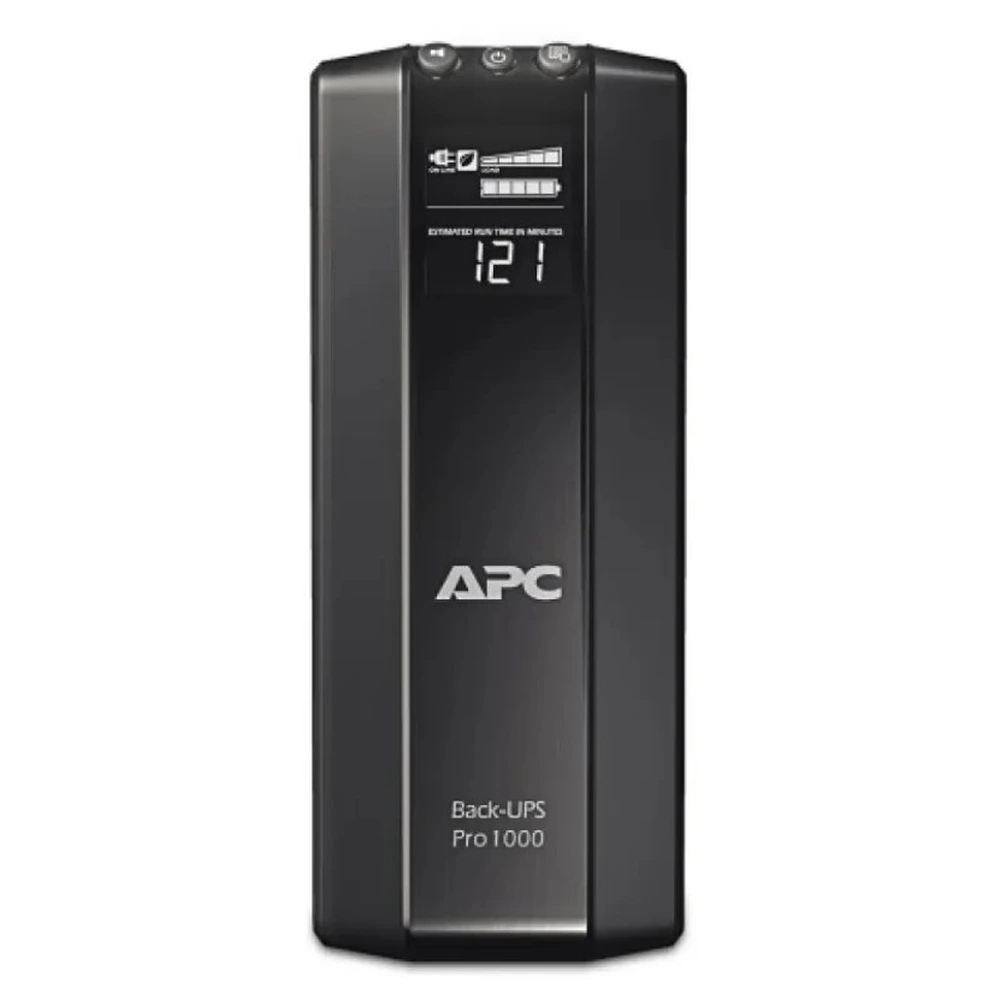
Its main features include:
1000VA/600W Output Capacity
The unit provides a rated output capacity of 1000VA/600W. Buyers can compare these ratings with the combined power consumption of their routers, modems, switches, and other intended loads to determine compatibility.
Automatic Voltage Regulation
The built-in AVR function increases output voltage when the incoming mains voltage drops below a safe level. This helps connected equipment continue operating without unnecessarily draining the battery during supported voltage fluctuations.
RJ-45 and RJ-11 Data Line Protection
The BR1000G-CN supports 10/100/1000 Mbps RJ-45 Ethernet protection and RJ-11 protection for telephone, fax, modem, and DSL connections. This is particularly relevant for network installations where communication lines also need surge protection.
355 Joules of Surge Protection
Its surge energy rating is 355 joules, providing an additional layer of protection against surges and electrical spikes.
Automatic Battery Self-Test and Audible Alarms
The UPS regularly tests its battery to help detect aging batteries. Audible alarms also notify users about battery replacement needs and power-related operating conditions.
Additional Operating and Safety Features
The BR1000G-CN also provides adjustable sensitivity settings, monitoring software, and a manually resettable circuit breaker. Its overtemperature protection issues a visual and audible warning and automatically shuts down the unit if the temperature remains critical.
The specified output voltage switching time is approximately 10 milliseconds, and the typical battery charging time is 8 hours.
With an operating efficiency of over 98%, the BR1000G-CN combines several power protection and management functions in a single standby UPS configuration.
For buyers searching for an ups 1000va solution for network-related applications, the BR1000G-CN offers a combination of battery backup, communication line protection, and voltage regulation features to consider when evaluating equipment compatibility.
Conclusion
Choosing the right UPS for routers, modems, and network equipment requires a clear understanding of power requirements, backup time, and protection features. Buyers should evaluate the total connected load, compare VA and watt ratings, and consider whether standby, line-interactive, or online UPS technology best suits their operating environment.
Features such as automatic voltage regulation, surge protection, data line protection, and battery monitoring can also influence the suitability of a UPS for a particular network installation. By comparing these specifications with actual application needs, businesses can select a solution that supports more reliable network operation during power disturbances.
If you are looking for a suitable UPS for your network equipment or need help comparing different UPS specifications, contact our team to discuss your application requirements and find an appropriate power protection solution.
Frequently Asked Questions
1. What size UPS do I need for a router and modem?
Check the power consumption of your router and modem, then calculate their combined load. Choose a UPS with sufficient VA and watt capacity to support both devices.
2. How long can a UPS power a router during an outage?
The backup time depends on the UPS battery capacity, battery condition, and connected load. A higher VA rating does not necessarily mean longer runtime.
3. Is a standby UPS suitable for network equipment?
A standby UPS can be suitable for basic network backup applications. However, the right UPS type depends on the equipment requirements, power conditions, and level of protection needed.