How to Choose a 20kVA 3-Phase UPS for Data Center Applications
Introduction
Reliable power is essential in data center environments, where interruptions, voltage disturbances, and unstable power conditions can affect IT equipment and critical operations. A UPS provides backup power while also helping protect connected loads from common power-quality problems.
For facilities considering a 20kVA UPS, capacity is only one part of the selection process. The UPS topology, real power output, battery configuration, efficiency, physical footprint, maintenance requirements, and monitoring capabilities can all affect whether a system fits the application.
This guide explains the main factors to consider when selecting a 20kVA 3-phase UPS for data center applications.
1. Start with the Power Requirements
1.1 Determine the Required UPS Capacity
The first step is to understand the electrical load that the UPS needs to support. A UPS rated at 20kVA should be evaluated against the actual connected load rather than selected based only on the nominal capacity.
Consider the equipment that will be connected to the UPS, its current power consumption, and whether the load is expected to increase in the future. Server racks and other IT equipment can also have different power characteristics, so the UPS should have sufficient capacity for the intended operating conditions.
For larger installations, it can also be useful to consider how the UPS will fit into the site’s overall power architecture rather than treating it as an isolated unit.
1.2 Consider Power Factor and Real Power
kVA and kW describe different aspects of UPS capacity. kVA represents apparent power, while kW represents real power delivered to the load.
Power factor is therefore an important consideration when comparing a 20kVA UPS. A unity power factor of 1.0 means that a 20kVA system can provide 20kW of real power under its rated conditions.
This can be particularly relevant for modern IT loads, where available real power is often more important than looking at the kVA rating alone.
2. Choose the Right UPS Topology
2.1 Double-Conversion Online UPS
For critical infrastructure, UPS topology is an important part of power protection. A double-conversion online UPS continuously converts incoming AC power to DC and then converts it back to AC for connected equipment.
This approach separates the output from many variations in the incoming power supply and provides continuous power conditioning. It is commonly considered for applications where consistent power quality is important.
When evaluating a 20kVA online UPS, check whether the system uses online double-conversion technology and what operating modes are available.
2.2 Efficiency and Operating Modes
Efficiency affects the amount of electrical energy consumed by the UPS itself and the associated heat that needs to be managed.
A UPS may provide different operating modes for different operating conditions. When comparing systems, look at the efficiency figures for the specific modes rather than relying on a single general efficiency claim.
For a data center, this information can be useful when assessing long-term operating costs alongside the initial equipment investment.
3. Consider Battery Configuration and Runtime
3.1 Internal vs. External Battery Systems
Battery configuration is another important consideration when choosing a UPS. Some UPS systems include internal batteries, while others are designed to work with external battery systems.
An external battery configuration can provide greater flexibility when a particular application requires a specific backup runtime or battery arrangement. The required runtime should be determined from the critical load and the expected duration of the backup requirement.
For this reason, a UPS without internal batteries is not necessarily a limitation. It can instead be a suitable configuration when the battery system is designed separately around the site’s requirements.
3.2 VRLA vs. Lithium-Ion Batteries
Battery technology should also be considered as part of the overall UPS design. VRLA and lithium-ion batteries are two options used with UPS systems, with different characteristics in terms of service life, weight, and system design.
When evaluating a lithium battery UPS configuration, consider the battery cabinet, required runtime, installation space, and compatibility with the UPS system rather than looking at battery technology alone.
4. Evaluate Space and Maintenance Requirements
4.1 Compact Footprint for Data Center Environments
Space can be limited in data centers, edge computing sites, and other IT facilities. A UPS with a compact footprint can make better use of available installation space.
Physical dimensions should therefore be checked alongside electrical specifications. It is also important to consider the space required for installation, battery systems, ventilation, and maintenance access.
4.2 Modular Design and Front-Access Maintenance
Maintenance requirements can affect the practical availability of a UPS over its service life. A modular architecture can simplify servicing by allowing components to be addressed without treating the entire system as a single fixed assembly.
Front-access maintenance can also be useful where installation space is constrained. When comparing UPS systems for data centers, maintenance access and serviceability should be considered together with electrical performance.
5. Check Efficiency and Power Management Features
5.1 UPS Efficiency and Total Cost of Ownership
UPS efficiency is directly related to energy use during operation. A more efficient operating mode can reduce the amount of energy lost within the UPS, which may also reduce associated cooling requirements.
However, efficiency should not be considered separately from power protection. When comparing a data center UPS, review the available operating modes, efficiency figures, load conditions, and required level of power protection together.
5.2 Remote Monitoring and Power Management
Visibility into UPS operating conditions can make power management easier. Depending on the system, monitoring may provide information about UPS status and operating conditions remotely.
For facilities with distributed equipment or limited on-site personnel, remote monitoring can help operators keep track of the UPS without being physically present at the equipment.
6. Consider the Operating Environment
6.1 Input and Output Voltage Requirements
Electrical compatibility should be confirmed before selecting a UPS. A three-phase system may support different nominal voltage configurations, but the actual input and output requirements of the installation must match the selected model.
For example, a system designed for 380V, 400V, or 415V three-phase operation may provide flexibility across different electrical environments, but the specific configuration still needs to be checked before installation.
6.2 Temperature and Installation Conditions
Operating temperature is another specification worth reviewing. The UPS should be installed within the manufacturer’s specified operating range.
Other physical characteristics, such as dimensions, weight, and ingress protection, can also affect installation planning. These details become particularly relevant when a UPS is being installed in an existing data center or a space with limited room.
7. APC Galaxy VS 20kVA as an Example
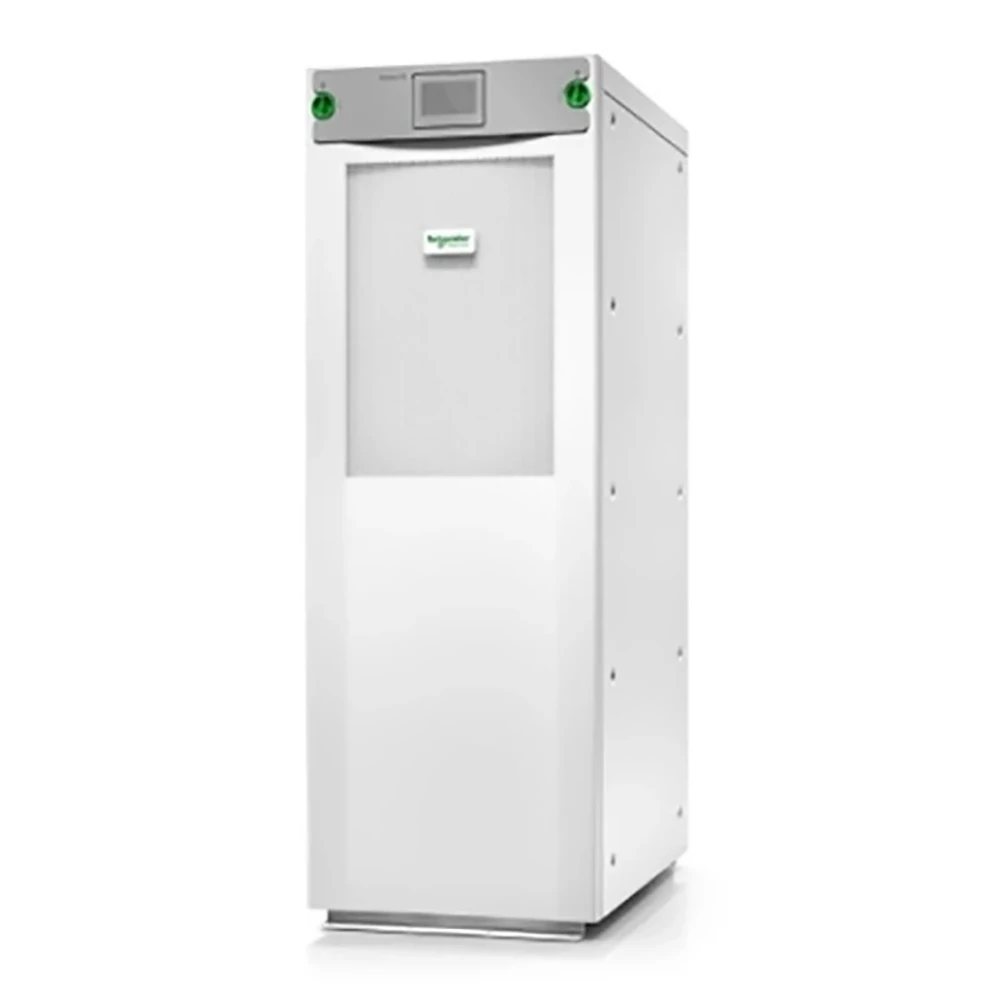
The APC Galaxy VS 20kVA (GVSUPS20KHS) is a 20kVA/20kW three-phase UPS designed for critical power applications in edge computing, small and medium data centers, healthcare, commercial buildings, and industrial automation.
The model uses double-conversion online UPS technology and provides a unity power factor of 1.0, allowing its 20kVA rating to correspond to 20kW of real power. Its nominal input and output voltage options are 380V, 400V, and 415V three-phase, with an input voltage range of 340V–460V at full load.
The GVSUPS20KHS is supplied without internal batteries and is designed for use with an external battery system. It is compatible with both VRLA and lithium-ion battery cabinets, allowing the battery configuration to be considered separately according to the required backup arrangement.
Efficiency is another notable characteristic. The system provides up to 97% efficiency in online double-conversion operation and up to 99% efficiency in ECOnversion™ mode. ECOnversion™ provides Class 1 compliant power protection while reducing energy and cooling requirements.
The unit has a compact design with dimensions of 333 × 847 × 1485 mm and a net weight of approximately 200kg, although the actual weight can vary by configuration. Its operating temperature range is 0°C to 40°C, and its ingress protection rating is IP20.
For maintenance, the Galaxy VS uses a modular architecture and front-access design. The system also supports EcoStruxure™ connectivity for remote monitoring and smartphone-based status alerts.
Other specifications include a maximum input current of 33A and output voltage distortion of less than 1% for linear loads. The system is listed with IEC 62040-1, IEC 62040-2, CE, and TUV compliance.
Conclusion
Choosing a 20kVA 3-phase UPS involves more than matching a kVA rating to the expected load. Power factor, UPS topology, battery configuration, efficiency, installation space, maintenance access, monitoring, and electrical compatibility all influence whether a system is appropriate for a particular data center environment.
A 20kVA online UPS with a unity power factor can provide 20kW of real power, while an external battery configuration can offer flexibility in designing the required backup system. For installations where efficiency and space are also important, these factors should be evaluated together rather than separately.
For applications requiring a compact three-phase UPS with external battery support, the APC Galaxy VS 20kVA GVSUPS20KHS provides a configuration that aligns with these selection considerations. Contact us to discuss the APC Galaxy VS 20kVA GVSUPS20KHS for your data center power requirements.
FAQs
1. What Does a 20kVA UPS Mean for Data Center Applications?
A 20kVA UPS provides a rated apparent power capacity of 20kVA. When the UPS has a unity power factor of 1.0, this corresponds to 20kW of real power under rated conditions. The actual suitability depends on the connected load and its power requirements.
2. Can a 20kVA UPS Use an External Battery System?
Yes. Some UPS systems are designed without internal batteries and can be connected to an external battery system. This configuration can provide flexibility when determining the required backup runtime and battery arrangement. Depending on the UPS, available battery options may include VRLA or lithium-ion batteries.
3. Why Is a 3-Phase Online UPS Suitable for Data Centers?
A 3-phase online UPS can provide continuous power conditioning through double-conversion technology while supporting three-phase electrical systems. For data center applications, factors such as power capacity, efficiency, battery configuration, monitoring, installation space, and maintenance access should all be considered when selecting a UPS.